Redux 的工作原理与使用
一、Redux 的定义
Redux 是 JavaScript 应用的状态容器,提供可预测的状态管理。
1、设计思想
- Web 应用是一个状态机,视图与状态是一一对应的;
- 所有的状态保存在一个对象中。
2、原理
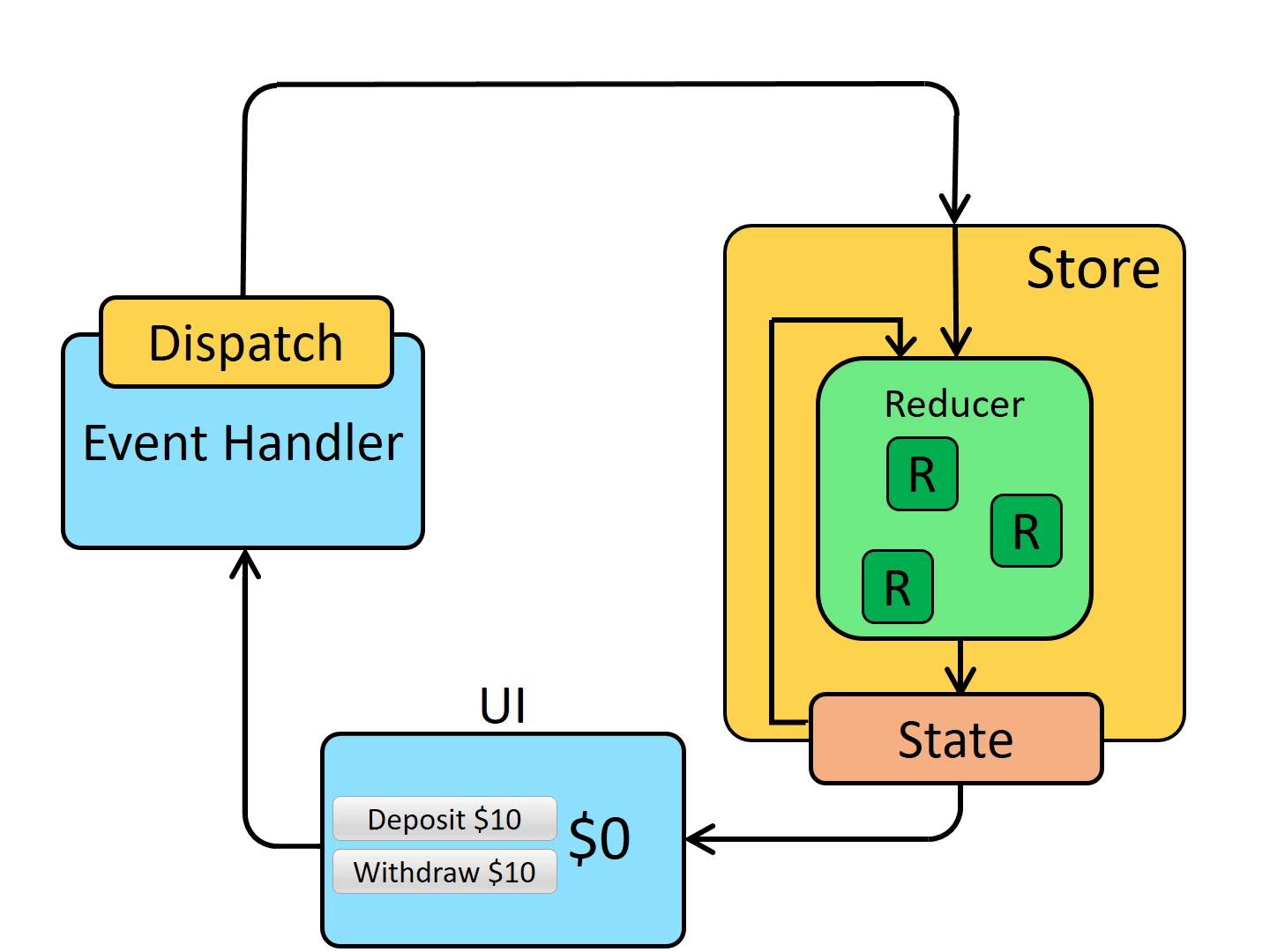
Redux 把公共数据都放在 store 中,这样当一个组件改变了 store 的数据,其他组件可以感知到 store 的变化并取得最新数据,从而间接的实现了这些数据的传递。
当组件需要修改 store 数据时,由于 Redux 只有一个单一的数据源,而且这个数据源是只读的,修改这个数据源必须通过 dispatch action,根据 action 的 type 和 text 匹配 Reducer,Reducer 会结合上一个 state 和 action 做出响应,返回新的 store,从而实现数据的修改。
3、应用场景
当组件有以下场景时,可以考虑使用 Redux:
- 某个组件需要共享状态时
- 某个状态需要在任何地方都可以被拿到时
- 一个组件需要改变另一个组件的状态时
- 一个组件需要改变全局状态时(语言切换、夜间模式、用户登陆等)
4、核心概念
4-1、Store
Store 就是保存数据的地方,可以把它看成一个容器,整个应用只能有一个 Store。Redux 提供 createStore 函数来创建 Store。
createStore(reducer, [preloadedState], [enhancer])
reducer(Function): 接收两个参数,分别是当前的 state 树和要处理的 action,返回新的 state 树。preloadedState(any): 初始时的 state。enhancer(Function): 用于组合 store creator 的高阶函数,返回一个新的强化过的 store creator。可以用中间间、时间旅行、持久化等来增强 store。Redux 中唯一内置的 store enhander 是applyMiddleware()。
举个例子:
import { createStore } from 'redux'
const store = createStore(fn)
上面 createStore 接受另一个函数 fn 作为参数,返回新生成的 Store 对象。
4-2、State
Store 对象包含所有数据,可以通过 store.getState() 拿到某个时点的数据,这种时点的数据集合,就叫做 State。
import { createStore } from 'redux'
const store = createStore(fn)

const state = store.getState()
Redux 规定 一个 State 对应一个 View。只要 State 相同,View 就相同。
4-3、Action
State 的变化,会导致 View 的变化。但用户接触不到 State,只能接触到 View。所以,State 的变化必须是 View 导致的。Action 就是 View 发出的通知,表示 State 应该要发生变化了。
Action 是一个对象。其中的 type 属性是必须的,表示 Action 的名称。其他属性可以自由设置,社区有一个规范可以参考。
const action = {
  type: 'ADD_TODO',
  payload: 'Learn Redux'
}
上面 Action 的名称是 ADD_TODO,它携带的信息是字符串 Learn Redux。
可以这么理解,Action 描述当前发生的事情。改变 State 的唯一办法,就是使用 Action,它会运送数据到 Store。
4-4、Action Creator
View 要发送多少种消息,就会有多少种 Action。如果都手写会很麻烦,可以定义一个函数来生成 Action,这个函数就叫 Action Creator。
bindActionCreators(actionCreators, dispatch)
actionCreators(Function | Object): 一个 Action Creator,或 value 是 Action Creator 的对象;dispatch(Function): 一个由 Store 实例提供的 dispatch 函数。
举个例子:
- SomeComponent.js
- TodoActionCreators.js
import { Component } from 'react'
import { bindActionCreators } from 'redux'
import { connect } from 'react-redux'

import * as TodoActionCreators from './TodoActionCreators'

class TodoListContainer extends Component {
  constructor(props) {
    super(props)

    const { dispatch } = props

    this.boundActionCreators = bindActionCreators(TodoActionCreators, dispatch)
    console.log(this.boundActionCreators)
  }

  componentDidMount() {
    // 由 react-redux 注入的 dispatch:
    let { dispatch } = this.props

    // 注意:这样是行不通的:
    // TodoActionCreators.addTodo('Use Redux')

    // 你只是调用了创建 action 的方法。
    // 你必须要同时 dispatch action。

    // 这样做是可行的:
    let action = TodoActionCreators.addTodo('Use Redux')
    dispatch(action)
  }

  render() {
    // 由 react-redux 注入的 todos:
    let { todos } = this.props

    return <TodoList todos={todos} {...this.boundActionCreators} />
  }
}

export default connect((state) => ({ todos: state.todos }))(TodoListContainer)
export function addTodo(text) {
  return {
    type: 'ADD_TODO',
    text
  }
}

export function removeTodo(id) {
  return {
    type: 'REMOVE_TODO',
    id
  }
}
上面 addTodo 函数就是一个 Action Creator。
4-5、dispatch
dispatch 是 View 发出 Action 的唯一方法。
import { createStore } from 'redux'
const store = createStore(fn)

store.dispatch({
  type: 'ADD_TODO',
  payload: 'Learn Redux'
})
上面代码中,store.dispatch 接受一个 Action 对象作为参数,将它发送出去。
结合 Action Creator,这段代码可以改写如下。
store.dispatch(addTodo('Learn Redux'))
4-6、Reducer
Store 收到 Action 后,必须返回一个新的 State,这样 View 才会发生变化。这种 State 的计算过程就叫做 Reducer。
Reducer 是一个函数,它接受 Action 和当前 State 作为参数,返回一个新的 State。
const reducer = function (state, action) {
  // ...
  return new_state
}
整个应用的初始状态,可以作为 State 的默认值。举个例子:
const defaultState = 0
const reducer = (state = defaultState, action) => {
  switch (action.type) {
    case 'ADD':
      return state + action.payload
    default:
      return state
  }
}

const state = reducer(1, {
  type: 'ADD',
  payload: 2
})
上面 reducer 函数收到名为 ADD 的 Action 后,就返回一个新的 State,作为加法的计算结果。
实际应用中,Reducer 函数不用像上面这样手动调用,store.dispatch 方法会触发 Reducer 的自动执行。为此 Store 需要知道 Reducer 函数,做法就是在生成 Store 时将 Reducer 传入 createStore 方法:
import { createStore } from 'redux'
const store = createStore(reducer)
上面 createStore 接受 Reducer 作为参数,生成一个新的 Store。以后每当 store.dispatch 发来一个新的 Action 就会自动调用 Reducer,得到新的 State。
注意:由于 Reducer 是纯函数,可以保证相同的 State 必定得到相同的 View。但也因为这一点,Reducer 函数中不能改变 State,必须返回一个全新的对象:
// State 是一个对象
function reducer(state, action) {
  return Object.assign({}, state, { thingToChange })
  // 或
  return { ...state, ...newState }
}

// State 是一个数组
function reducer(state, action) {
  return [...state, newItem]
}
最好把 State 对象设为只读,要得到新的 State,唯一办法就是生成一个新对象。这样的好处是,任何时候与某个 View 对应的 State 总是一个不变的对象。
4-7、subscribe
Store 允许使用 subscribe 方法设置监听函数,一旦 State 发生变化,就自动执行这个函数。
import { createStore } from 'redux'
const store = createStore(reducer)

store.subscribe(listener)
只要把 View 的更新函数放入 listener,就可以实现 View 的自动渲染。
store.subscribe(listener) 方法返回一个函数,调用这个函数就可以解除监听。
let unsubscribe = store.subscribe(
  () => console.log(store.getState())
)

unsubscribe()
二、Redux 的使用
1、安装
# npm
npm install redux

# yarn
yarn add redux
2、基本用法
下面用 Redux 实现一个简单的计数器:
- src/App.js
- src/store/index.js
import React, { useState } from 'react'
import store from './store/index'

const App = () => {
  const curCount = store.getState().count
  const [count, setCount] = useState(curCount)

  const handleAddCount = () => {
    store.dispatch({
      type: 'ADD_COUNT'
    })
    setCount(store.getState().count)
  }

  const handleSubCount = () => {
    store.dispatch({
      type: 'SUB_COUNT'
    })
    setCount(store.getState().count)
  }

  const handleMultiCount = () => {
    store.dispatch({
      type: 'MULTI_COUNT',
      payload: store.getState().count
    })
    setCount(store.getState().count)
  }

  return (
    <div>
      <button onClick={handleAddCount}>+1</button>
      <button onClick={handleSubCount}>-1</button>
      <button onClick={handleMultiCount}>× last</button>
      <span>{count}</span>
    </div>
  )
}

export default App
import { createStore } from 'redux'

const defaultState = {
  count: 0
}
const reducer = (state = defaultState, action) => {
  const newState = JSON.parse(JSON.stringify(state))  // 深拷贝
  switch (action.type) {
    case 'ADD_COUNT':
      newState.count += 1
      return newState
    case 'SUB_COUNT':
      newState.count -= 1
      return newState
    case 'MULTI_COUNT':
      newState.count *= action.payload
      return newState
    default:
      return newState
  }
}

const store = createStore(reducer)
export default store
运行效果:

3、store 结构优化
3-1、分离出 Reducer
将 reducer 单独分离出来,方便管理:
- src/store/index.js
- src/store/reducer.js
import { createStore } from 'redux'
import reducer from './reducer'

const store = createStore(reducer)
export default store
const defaultState = {
  count: 0
}

export default function reducer(state = defaultState, action) {
  const newState = JSON.parse(JSON.stringify(state))  // 深拷贝
  switch (action.type) {
    case 'ADD_COUNT':
      newState.count += 1
      return newState
    case 'SUB_COUNT':
      newState.count -= 1
      return newState
    case 'MULTI_COUNT':
      newState.count *= action.payload
      return newState
    default:
      return newState
  }
}
3-2、分离出 action 处理逻辑
将 Reducer 中的判断及逻辑处理分离,方便管理:
const defaultState = {
  count: 0
}

const handleAddCount = (state, action) => {
  const newState = JSON.parse(JSON.stringify(state)) // 深拷贝
  newState.count += 1
  return newState
}

const handleSubCount = (state, action) => {
  const newState = JSON.parse(JSON.stringify(state)) // 深拷贝
  newState.count -= 1
  return newState
}

const handleMultiCount = (state, action) => {
  const newState = JSON.parse(JSON.stringify(state)) // 深拷贝
  newState.count *= action.payload
  return newState
}

export default function reducer(state = defaultState, action) {
  switch (action.type) {
    case 'ADD_COUNT':
      return handleAddCount(state, action)
    case 'SUB_COUNT':
      return handleSubCount(state, action)
    case 'MULTI_COUNT':
      return handleMultiCount(state, action)
    default:
      return state
  }
}
可以将上面 reducer 提取出来的处理逻辑单独放在一个 actions 文件中,方便管理:
- src/store/reducer.js
- src/store/actions.js
import * as actions from './actions'

const defaultState = {
  count: 0
}

export default function reducer(state = defaultState, action) {
  switch (action.type) {
    case 'ADD_COUNT':
      return actions.handleAddCount(state, action)
    case 'SUB_COUNT':
      return actions.handleSubCount(state, action)
    case 'MULTI_COUNT':
      return actions.handleMultiCount(state, action)
    default:
      return state
  }
}
export const handleAddCount = (state, action) => {
  const newState = JSON.parse(JSON.stringify(state)) // 深拷贝
  newState.count += 1
  return newState
}

export const handleSubCount = (state, action) => {
  const newState = JSON.parse(JSON.stringify(state)) // 深拷贝
  newState.count -= 1
  return newState
}

export const handleMultiCount = (state, action) => {
  const newState = JSON.parse(JSON.stringify(state)) // 深拷贝
  newState.count *= action.payload
  return newState
}
3-3、分离出 actionTypes
action 拥有一个不变的 type 以便 reducer 能够识别它们,这个 action type 建议定义为 string 常量。例如:
const ADD_TODO = 'ADD_TODO'
这么做有以下好处:
- 所有的 action type 汇总在同一位置,可以避免命名冲突,也便于寻找;
- 当 import 的 action type 常量拼写错误,dispatch 这个 action 时会报错,可以快速定位问题。
可以将前面优化步骤的 action type 分离出来,写在一个文件中:
- src/store/reducer.js
- src/store/actionTypes.js
import * as actions from './actions'
import * as actionTypes from './actionTypes'

const defaultState = {
  count: 0
}

export default function reducer(state = defaultState, action) {
  switch (action.type) {
    case actionTypes.ADD_COUNT:
      return actions.handleAddCount(state, action)
    case actionTypes.SUB_COUNT:
      return actions.handleSubCount(state, action)
    case actionTypes.MULTI_COUNT:
      return actions.handleMultiCount(state, action)
    default:
      return state
  }
}
export const ADD_COUNT = 'ADD_COUNT'
export const SUB_COUNT = 'SUB_COUNT'
export const MULTI_COUNT = 'MULTI_COUNT'
3-4、使用 combineReducers 拆分 reducers
随着项目变得越来越复杂,可以将 reducer 函数拆分成多个函数来独立管理 state 的一部分。
combineReducers 可以把多个 reducer 函数合并成一个最终的 reducer 函数。合并后的 reducer 可以调用各个子 reducer,并把它们返回的结果合并成一个 state 对象。
由 combineReducers() 返回的 state 对象,会将传入的 reducer 返回的 state 按其传递给 combineReducers() 时对应的 key 进行命名。举个例子:
rootReducer = combineReducers({
  potato: potatoReducer,
  tomato: tomatoReducer
})
// rootReducer 将返回如下的 state 对象
{
  potato: {
    // ... potatoes, 和由 potatoReducer 管理的 state 对象 ...
  },
  tomato: {
    // ... tomatoes, 和由 tomatoReducer 管理的 state 对象,比如说 sauce 属性 ...
  }
}
上面通过为传入对象的 reducer 命名不同的 key 来控制返回 state key 的命名。例如:
// 可以调用
combineReducers({ todos: myTodosReducer, counter: myCounterReducer })
// 将 state 结构变为
{ todos, counter }

// 通常的做法是命名 reducer,然后 state 再去分割那些信息,这样就可以使用 ES6 的简写方法:
combineReducers({ counter, todos })
// 这与
combineReducers({ counter: counter, todos: todos })
// 是等价的
接下来对上面 src/store/reducer.js 中 counter 拆分出来:
- src/store/reducers/index.js
- src/store/reducers/counter.js
import { combineReducers } from 'redux'
import counter from './counter'

export default combineReducers({
  counter,
  // ... 其它拆分的 reducers 函数
})
import * as actions from '../actions'
import * as actionTypes from '../actionTypes'

const defaultState = {
  count: 0
}

export default function counter(state = defaultState, action) {
  switch (action.type) {
    case actionTypes.ADD_COUNT:
      return actions.handleAddCount(state, action)
    case actionTypes.SUB_COUNT:
      return actions.handleSubCount(state, action)
    case actionTypes.MULTI_COUNT:
      return actions.handleMultiCount(state, action)
    default:
      return state
  }
}
拆分完,记得更新原 reducer 的引入以及引用的 reducer state 的值:
- src/App.js
- src/store/index.js
import React, { useState } from 'react'
import store from './store/index'

const App = () => {
  const curCount = store.getState().count
  const curCount = store.getState().counter.count
  const [count, setCount] = useState(curCount)

  const handleAddCount = () => {
    store.dispatch({
      type: 'ADD_COUNT'
    })
    setCount(store.getState().count)
    setCount(store.getState().counter.count)
  }

  const handleSubCount = () => {
    store.dispatch({
      type: 'SUB_COUNT'
    })
    setCount(store.getState().count)
    setCount(store.getState().counter.count)
  }

  const handleMultiCount = () => {
    store.dispatch({
      type: 'MULTI_COUNT',
      payload: store.getState().count
      payload: store.getState().counter.count
    })
    setCount(store.getState().count)
    setCount(store.getState().counter.count)
  }

  return (
    <div>
      <button onClick={handleAddCount}>+1</button>
      <button onClick={handleSubCount}>-1</button>
      <button onClick={handleMultiCount}>× last</button>
      <span>{count}</span>
    </div>
  )
}

export default App
import { createStore } from 'redux'
import reducer from './reducer'
import reducer from './reducers/index'

const store = createStore(reducer)
export default store
3-5、全局注入 store
上面是直接在组件中 import store,也可以直接在最外层容器组件中初始化 store,然后将 state 上的属性作为 props 层层传递下去。但更好的方法是使用 react-redux 提供的 Provider 全局注入。
首先安装 react-redux 库:
# npm
npm install react-redux

# yarn
yarn add react-redux
注入方式如下:
- 在入口文件引入 store
- 在组件中使用 store
import React from 'react';
import ReactDOM from 'react-dom';
import App from './App'
import store from './store'
import { Provider } from 'react-redux'

ReactDOM.render(
  <Provider store={store}>
    <App />
  </Provider>,
  document.getElementById('root')
)
import React from 'react'
// import store from './store/index'
import { useSelector, useDispatch } from 'react-redux'

const App = () => {
  // const curCount = store.getState().counter.count
  // const [count, setCount] = useState(curCount)
  const count = useSelector((state) => state.counter.count)
  const dispatch = useDispatch()

  const handleAddCount = () => {
    // store.dispatch({
    // type: 'ADD_COUNT'
    // })
    // setCount(store.getState().counter.count)
    dispatch({ type: 'ADD_COUNT' })
  }

  const handleSubCount = () => {
    // store.dispatch({
    // type: 'SUB_COUNT'
    // })
    // setCount(store.getState().counter.count)
    dispatch({ type: 'SUB_COUNT' })
  }

  const handleMultiCount = () => {
    // store.dispatch({
    // type: 'MULTI_COUNT',
    // payload: store.getState().counter.count
    // })
    // setCount(store.getState().counter.count)
    dispatch({ type: 'MULTI_COUNT', payload: count })
  }

  return (
    <div>
      <button onClick={handleAddCount}>+1</button>
      <button onClick={handleSubCount}>-1</button>
      <button onClick={handleMultiCount}>× last</button>
      <span>{count}</span>
    </div>
  )
}

export default App
注意:如果使用 TS 的话,可能会出现以下错误:

需要做以下处理 ▼
import { createStore } from 'redux'
import reducers from './reducers/index'

const store = createStore(reducers)
export default store

export type RootState = ReturnType<typeof store.getState>
export type AppDispatch = typeof store.dispatch
然后新建 hooks 文件 ▼
import type { TypedUseSelectorHook} from 'react-redux';
import { useDispatch, useSelector } from 'react-redux'
import type { RootState, AppDispatch } from './index'

// Use throughout your app instead of plain `useDispatch` and `useSelector`
export const useAppDispatch = () => useDispatch<AppDispatch>()
export const useAppSelector: TypedUseSelectorHook<RootState> = useSelector
在组件引入新声明的 hooks ▼
import React from 'react'
import './index.scss'
import { useSelector, useDispatch } from 'react-redux'
import { useAppSelector, useAppDispatch } from './store/hooks'

const App = () => {
  const count = useSelector((state) => state.counter.count)
  const count = useAppSelector((state) => state.counter.count)
  const dispatch = useDispatch()
  const dispatch = useAppDispatch()

  const handleAddCount = () => {
    dispatch({ type: 'ADD_COUNT' })
  }

  const handleSubCount = () => {
    dispatch({ type: 'SUB_COUNT' })
  }

  const handleMultiCount = () => {
    dispatch({ type: 'MULTI_COUNT', payload: count })
  }

  return (
    <div>
      <button onClick={handleAddCount}>+1</button>
      <button onClick={handleSubCount}>-1</button>
      <button onClick={handleMultiCount}>× last</button>
      <span>{count}</span>
    </div>
  )
}

export default App
react-redux 还可以使用 useStore 的 Hook 来引入 store,然后进行原始的 store 操作。
三、Rudux 生态
1、Redux Toolkit
Redux Toolkit 是 Redux 官方提供的编写 Redux 逻辑的方法。它简化了大多数 Redux 任务,防止了常见错误,并使编写 Redux 应用程序变得更加容易。
安装:
# npm
npm install @reduxjs/toolkit

# yarn
yarn add @reduxjs/toolkit
1-1、configureStore
configureStore 用于包装 createStore。可以组合切片 reducers、添加 Redux 中间件,集成并默认开启 redux-thunk、Redux DevTools 扩展。
import { createStore } from 'redux'
import { configureStore } from '@reduxjs/toolkit'
import reducers from './reducers/index'

const store = createStore(reducers)
const store = configureStore({
  reducer: reducers
})
export default store
1-2、createAction()
createAction 用于创建一个 action。可以直接传入 action type 字符串来替代 type 常量,返回 action 函数。使用如下:
- 创建 Action
- 在组件中引入导出的 Action
import * as actions from '../actions'
import * as actionTypes from '../actionTypes'
import { createAction } from '@reduxjs/toolkit'

export const addCount = createAction('ADD_COUNT')
export const subCount = createAction('SUB_COUNT')
export const multiCount = createAction('MULTI_COUNT')

const defaultState = {
  count: 0
}

export default function counter(state = defaultState, action) {
  switch (action.type) {
    case actionTypes.ADD_COUNT:
    case addCount.type:
      return actions.handleAddCount(state, action)
    case actionTypes.SUB_COUNT:
    case subCount.type:
      return actions.handleSubCount(state, action)
    case actionTypes.MULTI_COUNT:
    case multiCount.type:
      return actions.handleMultiCount(state, action)
    default:
      return state
  }
}
import React from 'react'
import './index.scss'
import { useSelector, useDispatch } from 'react-redux'
import { addCount, subCount, multiCount } from './store/reducers/counter'

const App = () => {
  const count = useSelector((state) => state.counter.count)
  const dispatch = useDispatch()

  const handleAddCount = () => {
    dispatch({ type: 'ADD_COUNT' })
    dispatch(addCount())
  }

  const handleSubCount = () => {
    dispatch({ type: 'SUB_COUNT' })
    dispatch(subCount())
  }

  const handleMultiCount = () => {
    dispatch({ type: 'MULTI_COUNT', payload: count })
    dispatch(multiCount(count))
  }

  return (
    <div>
      <button onClick={handleAddCount}>+1</button>
      <button onClick={handleSubCount}>-1</button>
      <button onClick={handleMultiCount}>× last</button>
      <span>{count}</span>
    </div>
  )
}

export default App
1-3、createReducer()
createReducer 用于创建一个 reducer。将 action type 映射到 case reducer 函数中,不用再写 switch-case,而且集成的 immer 可以编写更简单的 immutable 更新,例如 state.todos [3] .completed = true
import * as actions from '../actions'
import { createAction } from '@reduxjs/toolkit'
import { createAction, createReducer } from '@reduxjs/toolkit'

export const addCount = createAction('ADD_COUNT')
export const subCount = createAction('SUB_COUNT')
export const multiCount = createAction('MULTI_COUNT')

const defaultState = {
  count: 0
}

export default function counter(state = defaultState, action) {
  switch (action.type) {
    case addCount.type:
      return actions.handleAddCount(state, action)
    case subCount.type:
      return actions.handleSubCount(state, action)
    case multiCount.type:
      return actions.handleMultiCount(state, action)
    default:
      return state
  }
}

const counter = createReducer(defaultState, {
  [addCount]: (state, action) => actions.handleAddCount(state, action),
  [subCount]: (state, action) => actions.handleSubCount(state, action),
  [multiCount]: (state, action) => actions.handleMultiCount(state, action)
})

export default counter
1-4、createSlice()
createSlice 用于创建一个 slice。接受一个 reducer 函数的对象、分片名称和初始状态值,并自动生成具有相应 action creators 和 action 类型的分片 reducer;
因此上面的 createAction 可以进一步优化掉 ▼
import * as actions from '../actions'
import { createAction, createReducer } from '@reduxjs/toolkit'
import { createSlice } from '@reduxjs/toolkit'

const defaultState = {
  count: 0
}

export const addCount = createAction('ADD_COUNT')
export const subCount = createAction('SUB_COUNT')
export const multiCount = createAction('MULTI_COUNT')

const counter = createReducer(defaultState, {
  [addCount]: (state, action) => actions.handleAddCount(state, action),
  [subCount]: (state, action) => actions.handleSubCount(state, action),
  [multiCount]: (state, action) => actions.handleMultiCount(state, action)
})

const counter = createSlice({
  name: 'counter',
  initialState: defaultState,
  reducers: {
    addCount: (state, action) => actions.handleAddCount(state, action),
    subCount: (state, action) => actions.handleSubCount(state, action),
    multiCount: (state, action) => actions.handleMultiCount(state, action)
  }
})

export default counter
注意 createSlice 创建出的 slice 的 reducer 属性值才是 reducer ▼
import { combineReducers } from 'redux'
import counter from './counter'

export default combineReducers({
  counter
  counter: counter.reducer
})
然后在组件中引入 slice 的 actions 属性值提取供 dispatch 使用的新 Action ▼
import React from 'react'
import './index.scss'
import { useSelector, useDispatch } from 'react-redux'
import { addCount, subCount, multiCount } from './store/reducers/counter'
import counter from './store/reducers/counter'

const App = () => {
  const count = useSelector((state) => state.counter.count)
  const dispatch = useDispatch()

  const handleAddCount = () => {
    dispatch(addCount())
    dispatch(counter.actions.addCount())
  }

  const handleSubCount = () => {
    dispatch(subCount())
    dispatch(counter.actions.subCount())
  }

  const handleMultiCount = () => {
    dispatch(multiCount(count))
    dispatch(counter.actions.multiCount(count))
  }

  return (
    <div>
      <button onClick={handleAddCount}>+1</button>
      <button onClick={handleSubCount}>-1</button>
      <button onClick={handleMultiCount}>× last</button>
      <span>{count}</span>
    </div>
  )
}

export default App
1-5、createAsyncThunk
createAsyncThunk 创建一个 thunk。用于处理异步 Action,接受 action type 和 payload,返回 promise,并生成一个发起基于该 promise 的 pending/fulfilled/rejected action 类型的 thunk;
创建 thunk 如下 ▼
import * as actions from '../actions'
import { createSlice } from '@reduxjs/toolkit'
import { createSlice, createAsyncThunk } from '@reduxjs/toolkit'
import axios from 'axios'

const defaultState = {
  count: 0
}

export const fetchTemperature = createAsyncThunk(
  'counter/fetchTemperature',
  async (city) => {
    const res = await axios.get(
      `http://wthrcdn.etouch.cn/weather_mini?city=${city}`
    )
    return res.data
  }
)

const counter = createSlice({
  name: 'counter',
  initialState: defaultState,
  reducers: {
    addCount: (state, action) => actions.handleAddCount(state, action),
    subCount: (state, action) => actions.handleSubCount(state, action),
    multiCount: (state, action) => actions.handleMultiCount(state, action)
  },
  extraReducers: {
    [fetchTemperature.fulfilled]: (state, action) => {
      console.log(action)
    }
  }
})

export default counter
注意上面创建的 thunk 是放在 extraReducers 下。使用 thunk 如下 ▼
import React from 'react'
import './index.scss'
import { useSelector, useDispatch } from 'react-redux'
import counter from './store/reducers/counter'
import counter, { fetchTemperature } from './store/reducers/counter'

const App = () => {
  const count = useSelector((state) => state.counter.count)
  const dispatch = useDispatch()

  const handleAddCount = () => {
    dispatch(counter.actions.addCount())
  }

  const handleSubCount = () => {
    dispatch(counter.actions.subCount())
  }

  const handleMultiCount = () => {
    dispatch(counter.actions.multiCount(count))
  }

  const handleFetchTemperature = () => {
    dispatch(fetchTemperature('广州'))
  }

  return (
    <div>
      <button onClick={handleAddCount}>+1</button>
      <button onClick={handleSubCount}>-1</button>
      <button onClick={handleMultiCount}>× last</button>
      <button onClick={handleFetchTemperature}>获取广州温度</button>
      <span>{count}</span>
    </div>
  )
}

export default App
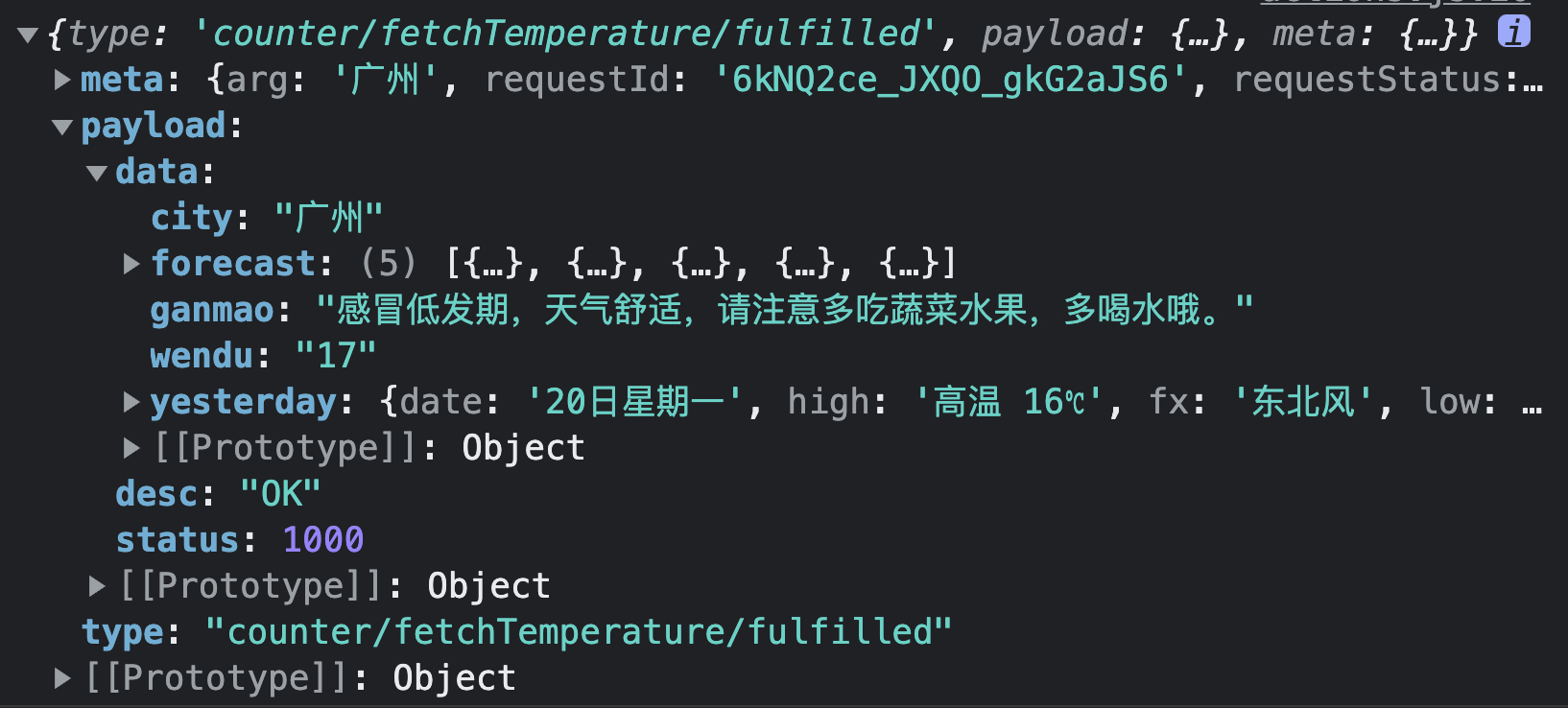
点击“获取广州温度”按钮输出结果:
1-6、createEntityAdapter
createEntityAdapter 用于生成一组可重用的 reducers 和 selectors,来管理规范化 store 数据。换句话说,就是利用所创建 Adapter 的 API 来操作 state。由 createEntityAdapter 方法生成的 entity state 结构如下:
{
  // 每个对象唯一的 id(string | number)
  // 可以在 createEntityAdapter 的 selectId 中设置对象的某个属性为该 id(索引值)
  ids: [],
  // 映射的实体对象
  entities: {}
}
创建 Adapter 如下 ▼
import * as actions from '../actions'
import { createSlice, createAsyncThunk } from '@reduxjs/toolkit'
import { createSlice, createAsyncThunk, createEntityAdapter } from '@reduxjs/toolkit'
import axios from 'axios'

const defaultState = {
  count: 0,
  temperature: 0
}

export const fetchTemperature = createAsyncThunk(
  'counter/fetchTemperature',
  async (city) => {
    const res = await axios.get(
      `http://wthrcdn.etouch.cn/weather_mini?city=${city}`
    )
    return res.data
  }
)

const playersAdapter = createEntityAdapter({
  // 将数组对象中每个对象的 id 属性存放在 Adapter 的 IDs 中
  selectId: (player) => player.id,
  // 将 IDs 中对应的每个对象以 id 为指定规则进行排序
  sortComparer: (a, b) => a - b
})

const counter = createSlice({
  name: 'counter',
  initialState: defaultState,
  initialState: playersAdapter.getInitialState(defaultState),
  reducers: {
    addCount: (state, action) => actions.handleAddCount(state, action),
    subCount: (state, action) => actions.handleSubCount(state, action),
    multiCount: (state, action) => actions.handleMultiCount(state, action),
    playerAdd: playersAdapter.addOne
  },
  extraReducers: {
    [fetchTemperature.fulfilled]: (state, action) => {
      actions.handleGetTemperature(state, action)
    }
  }
})

export default counter
addOne API 使用
<div className="player-container">
  <button
    onClick={() =>
      dispatch(
        counter.actions.playerAdd({ id: '006', name: 'UZI' })
      )
    }
  >
    playerAdd006
  </button>
  <button
    onClick={() =>
      dispatch(
        counter.actions.playerAdd({ id: '001', name: 'clearlove' })
      )
    }
  >
    playerAdd001
  </button>
</div>
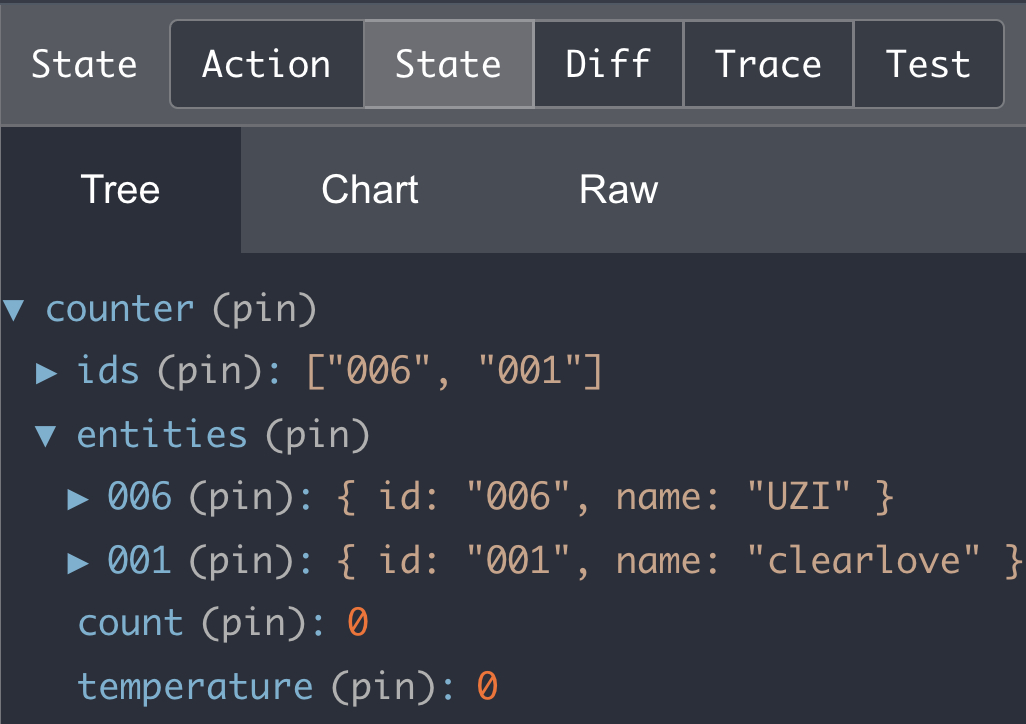
点击效果如下:
1-7、createSelector 组件
来自 Reselect 库,被重新导出,用于 state 缓存,防止不必要的计算。
举个例子:
const testState = {
  a: 1,
  b: 2,
  c: 3
}

const addValue1 = createSelector(
  (state) => state.a,
  (state) => state.b,
  (state) => state.c,
  (value1, value2, value3) => value1 + value2 + value3
)

const addValue2 = createSelector(
  [(state) => state.a, (state) => state.b, (state) => state.c],
  (value1, value2, value3) => value1 + value2 + value3
)

console.log(addValue1(testState)) // 6
console.log(addValue2(testState)) // 6
上面在 createSelector 的最后一个参数中进行前面参数结果的缓存处理。
2、rematch
rematch 是对 redux 的二次封装,简化了 redux 的使用,极大的提高了开发体验(没有多余的 action types、action creators、switch 语句或 thunks)
rematch 的优点:
省略了 action types
不必再多次写字符串,转而使用 model/method 代替;
省略了 action creators
可以直接调用方法,不必再生产 action type,转而使用 dispatch.model.method 代替;
省略了 switch 语句
调用 model.method 方法,不必判断 action type;
集中书写状态,同步和异步方法
在一个 model 中使用 state、reducers 和 effects 来写状态,同步和异步方法
rematch 的安装:
# npm
npm install @rematch/core
# yarn
yarn add @rematch/core
2-1、init × models
init 使用 models 属性初始化 store,需要配合以下格式的 modal:
const count = {
  state: 0,
  reducers: {
    upBy: (state, payload) => state + payload
  },
  effects: {
    async loadData(payload, rootState) {
      const response = await fetch('xx/data')
      const data = await response.json()
      console.log(data)
    }
  }
}

init({
  models: {
    count
  }
})
原 redux 写法改造如下 ▼
- src/store/index.js
- src/store/reducers/counter.js
- src/App.jsx
import { createStore, combineReducers } from 'redux'
import { init } from '@rematch/core'
import counter from './reducers/counter'

const store = createStore(
  combineReducers({
    counter
  })
)
const store = init({
  models: {
    counter
  }
})

export default store
import * as actionTypes from '../actionTypes'

const defaultState = {
  count: 0
}

const handleAddCount = (state, action) => {
const handleAddCount = (state, payload) => {
  const newState = JSON.parse(JSON.stringify(state))
  newState.count += 1
  return newState
}

const handleSubCount = (state, action) => {
const handleSubCount = (state, payload) => {
  const newState = JSON.parse(JSON.stringify(state))
  newState.count -= 1
  return newState
}

const handleMultiCount = (state, action) => {
const handleMultiCount = (state, payload) => {
  const newState = JSON.parse(JSON.stringify(state))
  newState.count *= action.payload
  return newState
}

function counter(state = defaultState, action) {
  switch (action.type) {
    case actionTypes.ADD_COUNT:
      return handleAddCount(state, action)
    case actionTypes.SUB_COUNT:
      return handleSubCount(state, action)
    case actionTypes.MULTI_COUNT:
      return handleMultiCount(state, action)
    default:
      return state
  }
}
const counter = {
  state: defaultState,
  reducers: {
    addCount: (state, payload) => handleAddCount(state, payload),
    subCount: (state, payload) => handleSubCount(state, payload),
    multiCount: (state, payload) => handleMultiCount(state, payload)
  }
}

export default counter
import React from 'react'
import './index.scss'
import { useSelector, useDispatch } from 'react-redux'

const App = () => {
  const count = useSelector((state) => state.counter.count)
  const dispatch = useDispatch()

  const handleAddCount = () => {
    dispatch({ type: 'ADD_COUNT' })
    dispatch.counter.addCount()
  }

  const handleSubCount = () => {
    dispatch({ type: 'SUB_COUNT' })
    dispatch.counter.subCount()
  }

  const handleMultiCount = () => {
    dispatch({ type: 'MULTI_COUNT', payload: count })
    dispatch.counter.multiCount(count)
  }

  return (
    <div>
      <button onClick={handleAddCount}>+1</button>
      <button onClick={handleSubCount}>-1</button>
      <button onClick={handleMultiCount}>× last</button>
      <span>{count}</span>
    </div>
  )
}

export default App
2-2、init × redux
init 初始化 store 的过程中,可以通过 redux 这个属性来兼容老项目中的 redux 配置。
使用 init 替代 createStore 创建 store ▼
import { createStore, combineReducers } from 'redux'
import { init } from '@rematch/core'
import counter from './reducers/counter'

const store = createStore(
  combineReducers({
    counter
  })
)
const store = init({
  redux: {
    reducers: {
      counter
    }
  }
})

export default store
3、reduxSaga
Redux 拥抱函数式编程,在处理异步时并不是很友好,但社区中有许多优秀的开源库可以直接使用,例如 Redux-Saga